Macro Loading
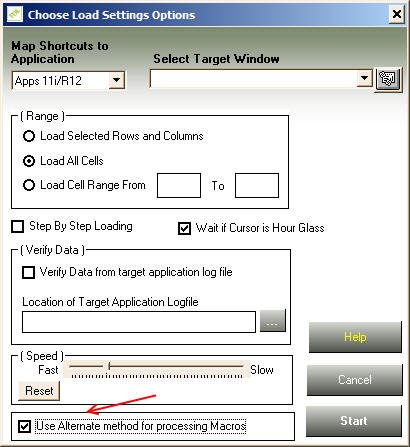
This usually happens if your target application form is running in Remote Desktop or a virtual server window, such as Citrix. To load the data properly in this scenario, check the "Use Alternate Method for Processing Macros" checkbox in the Choose Load Settings Options window, as shown below.
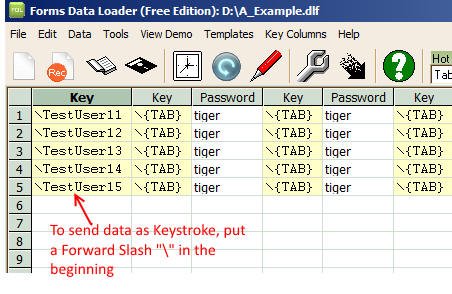
If the above setting doesn't work, you can load data properly by sending it as keystrokes instead of copy-pasting. To send data as keystrokes, put a forward slash "\" in front of the data. Example shown below.
There can be many reasons:
- Make sure you're using the right keystrokes to move between fields and the right keys to save the record.
- Forms Data Loader may be sending data faster than the target application can process it. Tune this by inserting delay times between cells — enter the amount of time in milliseconds preceded by "#", e.g. "#500" tells FDL to wait 500 milliseconds.
- Use the Step-by-Step Loading feature: FDL will show a dialog after processing each cell, which is great for finding out whether your keystrokes are doing what you expect.
- Use the Verify Data option to verify data as entered into the target application — see the help file that comes with Forms Data Loader for more information.
No, you can use FDL to load data into any active window, whether a customized application form or an HTML form. FDL does contain special shortcuts for loading data into Oracle Applications.
Please click here to see the list of keystrokes.
For Macro Loading, Forms Data Loader uses the .dlf extension; for Forms Playback files it uses the .fdl extension.
Yes. To use Forms Data Loader for languages other than English (such as Chinese or Korean), set up Windows as follows.
In Windows 7:
- Click "Start Menu" → "Control Panel"
- In "Clock, Language and Region," click "Change Keyboard and other input methods"
- Click the "Administrative" tab
- Click "Change System Locale" under "Language for Non-Unicode programs"
- Choose your desired language from the drop-down list
- Click "OK" (Windows may ask you to restart — if so, restart)
- Also change the Default Font and Font for Data Cells to "Arial Unicode MS" via the Options toolbar button in Forms Data Loader
In Windows XP:
- Click "Start Menu" → "Settings" → "Control Panel"
- Double-click "Regional Options"
- Select the non-English language you want under "General" → "Language settings for the system" (e.g. Simplified Chinese)
- Set it as the default language — this step is required
By entering a \{SPACE} keystroke in the cell.
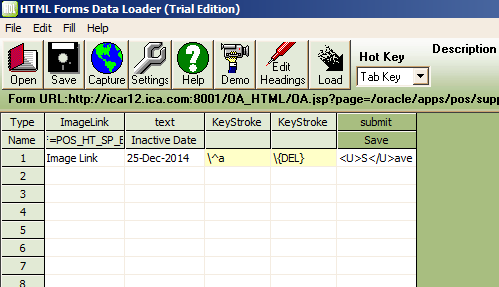
Yes, you can use the Macro Loading feature to load data into HTML forms. However, we strongly recommend our special tool HTML Forms Data Loader for this purpose — it loads data much faster and more accurately than macro loading.
By entering the initial characters as keystrokes in the cell. For example, if the list looks like this and you want to select "Argentina":
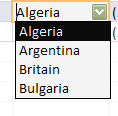
Pressing "A" once selects "Algeria"; pressing "A" again selects "Argentina." So you'd enter a keystroke like \AA.
Yes, by entering *MC(x,y) in the spreadsheet cell, where X and Y are screen coordinates. For example, *MC(430,240) simulates a left mouse click at that coordinate during loading. To capture exact coordinates, use the Get Screen Coordinate Tool from the Tools menu.
Yes. If you've already saved and successfully run a macro load, you can re-run it without interaction using the -run command-line argument. For example, to run "test.dlf" automatically, create a shortcut with:
C:\Program files\Forms Data Loader\FDLoader.exe -run c:\test.dlf
This launches Forms Data Loader, loads test.dlf, and starts loading in the target application without any user interaction. The target application window used the first time you ran test.dlf must be open, otherwise FDL will prompt you to start it first.
Keep checking this website — we publish new templates regularly.