
Hi
I am trying to learn the basics of the HTML loader via Capture. I have used a similar product in the past, though not specifically designed for HTML.
After opening the Oracle HTML screen, I switch back to HTML loader. Am finding that the drop-down for windows is empty. If I click Start Recording I get error attached.
Would appreciate your advice on overcoming what should be a very simple problem.

To record in HTML Forms Data Loader what you have to do is type the address in address box provided in HDL browser window and then login to Oracle Apps and then navigate to the desired page and then press "Start Recording" button. There is no need of navigating using Internet Explorer.
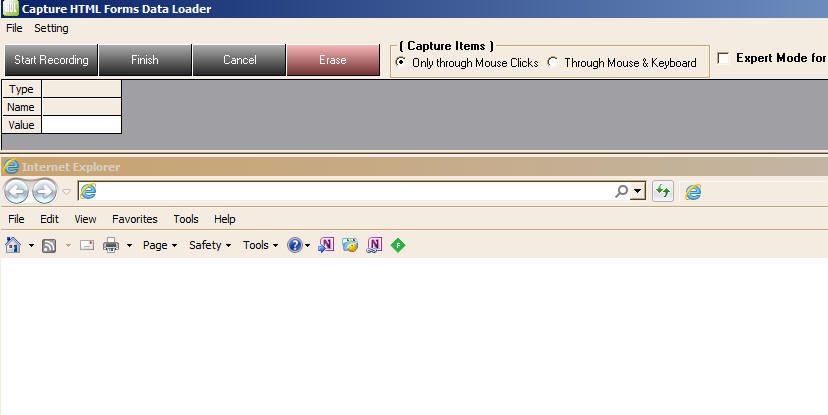
For detail information on how to use HTML Forms Data Loader please visit
http://www.formsdataloader.com//how_to_load_data_using_html_form.htm
Support for languages other than English
6/5/2011
I was checking out your product with the aim of its probable mass acquiring for the company I am working in.
We are now having Oracle 11.5.10 version.
I found 2 issues that are not acceptable.
1) I can not see any support for cyrilic characters
2) the wait for hour glass option does not work.
What can you say regarding this issues?
Regarding your queries
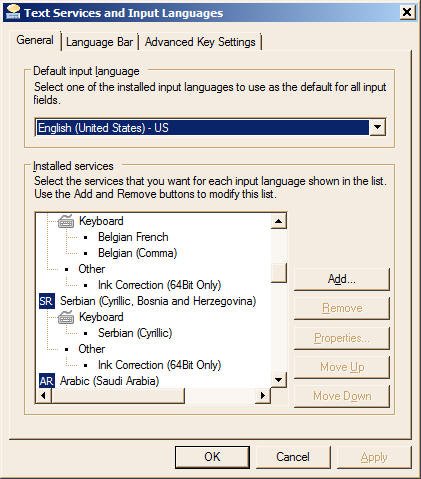
1) If you want to use Forms Data Loader for languages other than default English such as Chinese, Korean etc, you need to setup Windows operating as follows
1. Click on "Start Menu" -> "Settings" -> "Control Panel" menu;
2. Double-click on "Regional Options" icon;
3. Select a non-English language you want to use, for example Simplified Chinese, in "Language settings for the system" box under "General" option;
4. Set "Simplified Chinese" as the default language, this step is required.
2. There was a bug in the previous version which was giving problem with Wait for Hour Glass option. We have fixed the issue in the latest edition and request you to download the latest edition
Hope this helps.